Simple Temperature Converter
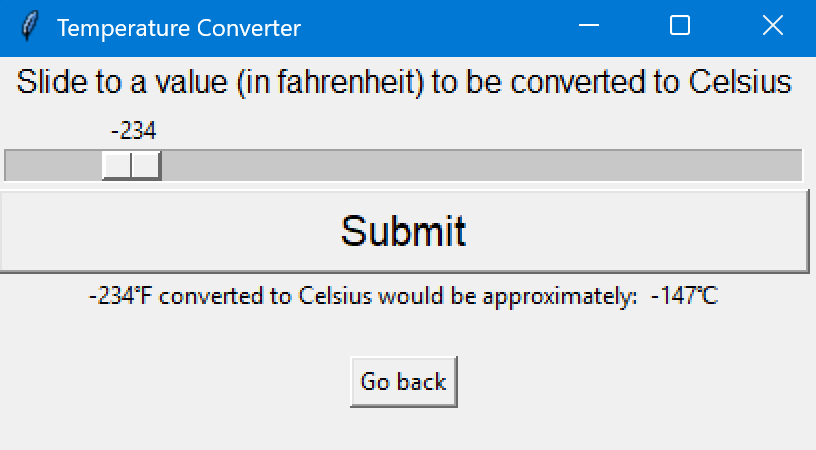
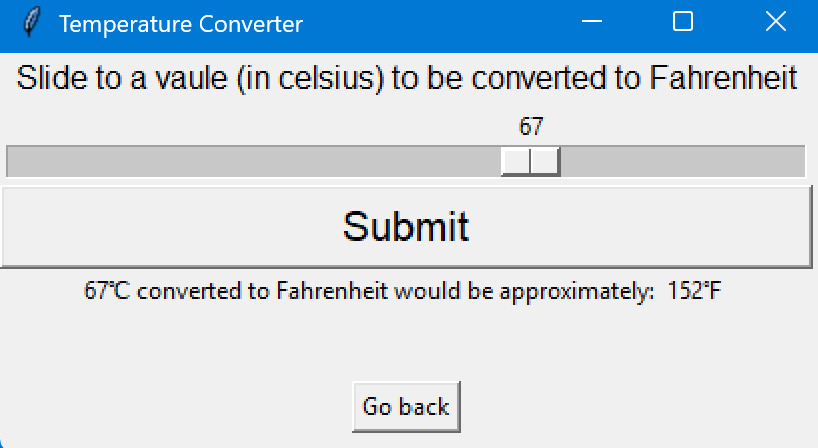
This small project took me all the way back in high school, where our task was to design a simple GUI using Python tkinter. I decided to implement a GUI temperature converter where users can go between pages and adjust the bar to their desired temperature. I tried to implement an input field where, instead of a horizontal bar, users could just input their temperature to be converted. Unfortunately, during that time, I was unable to handle edge cases of user input, such as when the user types -999999999 or if the user enters a string. A few years later, I am now in college, and I learned a lot in terms of computer science, in which I am confident, going back and fixing the issues as well as perhaps updating the code to be more visually appealing to the user as well as maybe including a Kelvin temperature as well.
Here is the code that illustrates my thought process during my junior year of high school:
#   a214_simple_window1.py
#   A program creates a window on your screen using Tkinter.
import tkinter as tk
#Tkinter slider orientation not working. Big help to this site:

#https://stackoverflow.com/questions/26582306/setting-orient-keyword-argument-for-tkinter-scale-widget-results-in-nameerror

from tkinter import HORIZONTAL

#main window
root = tk.Tk()
root.wm_geometry("540x200")
root.title("Temperature Converter")

#Functions
#Function to convert celsius to fahrenheit
def cel_result():
  Celsius.tkraise()
  cel_result = cel_input.get()
  math =int(cel_result * 1.8 + 32)
  final_result = tk.Label(Celsius, text=(str(cel_result) + "℃ converted to Fahrenheit would be approximately:" + "  " + str(math) + "℉ \n"))
  final_result.grid(row=3, column=0, sticky="news")

#Function to go from fahrenheit to celsius
def fahr_result():
  Fahrenheit.tkraise()
  fahr_result = fahr_input.get()
  math = int(5/9 * (fahr_result - 32))
  final_result =  tk.Label(Fahrenheit, text=(str(fahr_result) + "℉ converted to Celsius would be approximately:" + "  " + str(math) + "℃"))
  final_result.grid(row=3, column=0, sticky="news")

#Goes back to front page
def go_back():
  front_page.tkraise()

#Three different frames/pages
front_page = tk.Frame(root)
Celsius = tk.Frame(root)
Fahrenheit = tk.Frame(root)
#The three grids for each page/frame
front_page.grid(row=0, column=0, sticky="news")
Celsius.grid(row=0, column=0, sticky="news")
Fahrenheit.grid(row=0, column=0, sticky="news")

#Button to convert celsius to fahrenheit
cel_btn = tk.Button(front_page, text="Celsius to Fahrenheit Converter", command=cel_result)
cel_btn.grid(row=0, column = 0, pady=70)
#Button to convert fahrenheit to celsius
fahr_btn = tk.Button(front_page, text="Fahrenheit to Celsius Converter", command=fahr_result)
fahr_btn.grid(row=0, column = 1, pady= 70)

#Celsius converter (Label for the slider that is in celsius)
cel_label = tk.Label(Celsius, text="Slide to a vaule (in celsius) to be converted to Fahrenheit", font=("Arial", 12))
cel_label.grid(row=0, column=0)
#This is the actual scale that slides to get the certain celsius value
cel_input = tk.Scale(Celsius, from_=-200, to=200, length=400, orient=HORIZONTAL)
cel_input.grid(row=1, column=0)
#Button that says "submit" and confirms the conversion from celsius to fahrenheit
btn_submit = tk.Button(Celsius, text="Submit", font="Arial", command=cel_result)
btn_submit.grid(row=2, column=0, sticky="news")

#Button that when clicked will bring you back to the front page
back_btn = tk.Button(Celsius, text="Go back", command=go_back)
back_btn.grid(row=4, column=0, pady=20)

#Fahrenheit converter (label explaining what the slider is and that it is in fahrenheit)
fahr_label = tk.Label(Fahrenheit, text="Slide to a value (in fahrenheit) to be converted to Celsius", font=("Arial, 12"))
fahr_label.grid(row=0, column=0)
#This is the slider that goes left and right from -328 to 392 fahrenheit which will be converted to celsius
fahr_input = tk.Scale(Fahrenheit, from_=-328, to=392, length=400, orient=HORIZONTAL)
fahr_input.grid(row=1, column=0)
#Button to submit the selected fahrenheit value to convert it to celsius
btn_submit = tk.Button(Fahrenheit, text="Submit", font="Arial", command=fahr_result)
btn_submit.grid(row=2, column=0, sticky="news")

#This button brings you back to the starting page
back_btn = tk.Button(Fahrenheit, text="Go back", command=go_back)
back_btn.grid(row=4, column=0, pady=20)

front_page.tkraise()
root.mainloop()

#Inspiration: https://www.geeksforgeeks.org/temperature-converter-using-tkinter/
I wanted to show this project in particular since I always wanted to create really friendly GUI’s to the users where I am very fascinated by websites that have a really great GUI or website in general. Take GitHub, for instance, their login page is really impressive and very “techie” in a way that it clearly shows what GitHub is, some famous organizations that use it and lots and lots of stats to show how good GitHub is. Another would be Apple’s website, especially for the iPhone since all their small clips and images are very high quality, indicating that the iPhones must also be very high quality as well. Seeing these websites motivates me to continue my studies in web development so that I could be able to create really fancy webpages, impress users, and overall showcase my creative side for computer science.
Feel free to look at my other high school projects here.